<?xml version="1.0" encoding="utf-8"?><feed xmlns="http://www.w3.org/2005/Atom" ><generator uri="https://jekyllrb.com/" version="3.9.5">Jekyll</generator><link href="https://eimertvink.nl/feed.xml" rel="self" type="application/atom+xml" /><link href="https://eimertvink.nl/" rel="alternate" type="text/html" /><updated>2024-05-19T08:14:36+00:00</updated><id>https://eimertvink.nl/feed.xml</id><title type="html">eimertvink.nl | humble thoughts and tech tips</title><subtitle>🇳🇱 Cloud Engineer. Passionate about Linux and Java. Curious and eager to learn.</subtitle><author><name>Eimert Vink</name></author><entry><title type="html">Microsoft Certified Azure Administrator Associate</title><link href="https://eimertvink.nl/2022/12/13/Microsoft-Certified-Azure-Administrator-Associate.html" rel="alternate" type="text/html" title="Microsoft Certified Azure Administrator Associate" /><published>2022-12-13T00:00:00+00:00</published><updated>2022-12-13T00:00:00+00:00</updated><id>https://eimertvink.nl/2022/12/13/Microsoft-Certified-Azure-Administrator-Associate</id><content type="html" xml:base="https://eimertvink.nl/2022/12/13/Microsoft-Certified-Azure-Administrator-Associate.html"><![CDATA[<p>On the 13th of December 2022 I passed
the <a href="https://learn.microsoft.com/en-us/credentials/certifications/exams/az-104/">AZ-104: Microsoft Azure Administrator</a>
exam!
Getting this Microsoft Azure Administrator certification was one of my goals for 2022.</p>

<ul>
  <li><a href="../../../portfolio/certifications/">Cert on my certifications page</a></li>
  <li><a href="https://www.linkedin.com/feed/update/urn:li:activity:7008522575756607490/">LinkedIn post</a></li>
  <li><a href="https://www.credly.com/badges/e7eec9c2-cafb-4246-9c9d-094056660a4f/eimertvink.nl">Cert on Credly</a></li>
</ul>

<figure class=" ">
  
    
      <img src="" alt="" />


</figure>]]></content><author><name>Eimert Vink</name></author><category term="cloud engineer" /><category term="azure" /><summary type="html"><![CDATA[AZ-104 Microsoft Azure Administrator Associate Certification]]></summary></entry><entry><title type="html">Hashicorp Terraform Associate certification</title><link href="https://eimertvink.nl/2022/08/12/Hashicorp-Terraform-Associate.html" rel="alternate" type="text/html" title="Hashicorp Terraform Associate certification" /><published>2022-08-12T00:00:00+00:00</published><updated>2022-08-12T00:00:00+00:00</updated><id>https://eimertvink.nl/2022/08/12/Hashicorp-Terraform-Associate</id><content type="html" xml:base="https://eimertvink.nl/2022/08/12/Hashicorp-Terraform-Associate.html"><![CDATA[<p>On the 12th of August 2022 I passed the <a href="https://www.hashicorp.com/certification/terraform-associate">Hashicorp Terraform Associate</a> exam!
A nice way to formalize years of experience both hobby and work related with this certification. Suffice to say I’m very excited about using Terraform for IaC and automated public and private cloud provisioning.</p>
<ul>
  <li><a href="../../../portfolio/certifications/">Cert on my certifications page</a></li>
  <li><a href="https://www.linkedin.com/feed/update/urn:li:activity:6963865942455918592/">LinkedIn post</a></li>
  <li><a href="https://www.credly.com/badges/110abef2-a8d4-48bb-93bb-5871434b7315/eimertvink.nl">Cert on Credly</a></li>
</ul>

<figure class=" ">
  
    
      <a href="https://eimerttech.files.wordpress.com/2022/08/hashicorp-certified-terraform-associate-002.png">
          <img src="https://eimerttech.files.wordpress.com/2022/08/hashicorp-certified-terraform-associate-002.png" alt="2022: Hashicorp Terraform Associate" />
      </a>


</figure>]]></content><author><name>Eimert Vink</name></author><category term="cloud engineer" /><category term="infrastructure as code" /><category term="infrastructure automation" /><category term="it infrastructure" /><category term="terraform" /><summary type="html"><![CDATA[Today I passed the Hashicorp Terraform Associate exam.]]></summary></entry><entry><title type="html">Blog layout update</title><link href="https://eimertvink.nl/2022/03/31/blog-layout-update.html" rel="alternate" type="text/html" title="Blog layout update" /><published>2022-03-31T00:00:00+00:00</published><updated>2022-03-31T00:00:00+00:00</updated><id>https://eimertvink.nl/2022/03/31/blog-layout-update</id><content type="html" xml:base="https://eimertvink.nl/2022/03/31/blog-layout-update.html"><![CDATA[<p>The Minimal Mistakes Jekyll theme skin <a href="https://mmistakes.github.io/minimal-mistakes/docs/configuration/#contrast-skin-contrast" target="_blank">contrast</a> has been replaced with <a href="https://mmistakes.github.io/minimal-mistakes/docs/configuration/#sunrise-skin-sunrise" target="_blank">sunrise</a>.</p>

<h4 id="why">Why?</h4>
<p>I find the contrast skin is too sterile, the red underline animation when hovering over menu items is too bright, too loud, too much screaming to me. The <span style="color:blue"><strong>blue</strong></span> blog post headers weren’t matching with anything else, thus not harmonious with the rest of the colors.</p>

<h4 id="the-new-skin">The new skin</h4>
<p>The sunrise skin looks more cozy, friendly and inviting imho. The blog posts headers are <span style="color:#e3344a"><strong>pink</strong></span> or red and matching with the menu items. I feel this new skin better conveys how I want to present myself online. I didn’t do much blogging last year, this new skin is a good motivation to start writing again.</p>

<h4 id="more-updates">More updates</h4>
<p>I’ve redesigned the showcase (its now called work), about and contact pages. Also made a separate page for certifications. Footer is also updated. I’m happy with the new version of the site. Send me a message to let me know what you think.</p>]]></content><author><name>Eimert Vink</name></author><category term="blog" /><summary type="html"><![CDATA[The Minimal Mistakes Jekyll theme skin *contrast* has been replaced with *sunrise*.]]></summary></entry><entry><title type="html">Blog now available as PWA</title><link href="https://eimertvink.nl/2021/01/17/blog-now-available-as-pwa.html" rel="alternate" type="text/html" title="Blog now available as PWA" /><published>2021-01-17T00:00:00+00:00</published><updated>2021-01-17T00:00:00+00:00</updated><id>https://eimertvink.nl/2021/01/17/blog-now-available-as-pwa</id><content type="html" xml:base="https://eimertvink.nl/2021/01/17/blog-now-available-as-pwa.html"><![CDATA[<p>I’m excited to announce that something I’ve wanted for a long time is now finally there (and works ‘good enough’ for now :blush:).
I’ve added PWA capabilities to this blog (hosted on Github-pages). This website is now installable and the (refreshed!) icon will sit among other apps.</p>

<p>The thing that is not yet working as desired are the offline capabilities. It’s only possible to see pages that have already been visited; unvisited pages wil give a 404.
I’m going to find out a solution for this. <a href="https://kurtlourens.com/">Kurt Lourens</a> has been a major source of inspiration to make this blog available as a PWA.</p>]]></content><author><name>Eimert Vink</name></author><category term="tech" /><summary type="html"><![CDATA[This website is now installable and the (refreshed!) icon will sit among other apps.]]></summary></entry><entry><title type="html">Enlarge an encrypted LUKS partition on LVM</title><link href="https://eimertvink.nl/2020/07/19/enlarge-an-encrypted-LUKS-partition-on-LVM.html" rel="alternate" type="text/html" title="Enlarge an encrypted LUKS partition on LVM" /><published>2020-07-19T00:00:00+00:00</published><updated>2020-07-19T00:00:00+00:00</updated><id>https://eimertvink.nl/2020/07/19/enlarge-an-encrypted-LUKS-partition-on-LVM</id><content type="html" xml:base="https://eimertvink.nl/2020/07/19/enlarge-an-encrypted-LUKS-partition-on-LVM.html"><![CDATA[<p>I recently upgraded my laptop SSD from 512GB to 1TB.
<img src="https://tweakers.net/i/dVbxOtqB6T84aIQ2uxdDRSSIelo=/fit-in/x800/filters:strip_icc():strip_exif()/i/2002979434.jpeg?f=imagegallery" alt="Kingston ssd" /></p>

<p>Getting the data over to the new SSD is a three-step process:</p>
<ol>
  <li>I made an image using <a href="clonezilla.org/">clonezilla</a> and an external hdd.</li>
  <li>Installed the new SSD and restored the clonezilla image.</li>
  <li><em>Increased the LVM and LUKS partition size to make use of all the space on the SSD.</em></li>
</ol>

<p>This article describes step 3 in detail.</p>

<blockquote>
  <p>:warning: <strong>Warning</strong>: I always recommend taking backups or snapshots. In case something goes wrong, you’re not
permanently burned and you can revert back to the previous setup.</p>
</blockquote>

<p>The encrypted partition in this guide is <code class="language-plaintext highlighter-rouge">/dev/nvme0n1p3</code>, you should adapt the commands for your own system.</p>

<h2 id="enlarge-an-encrypted-partition">Enlarge an encrypted partition</h2>
<ol>
  <li>Boot with your (favourite) distro’s live CD.</li>
  <li>
    <p>Remove and recreate the existing partition using fdisk.</p>

    <div class="language-plaintext highlighter-rouge"><div class="highlight"><pre class="highlight"><code> sudo fdisk /dev/nvme0n1
</code></pre></div>    </div>
    <p>This was my fdisk session:</p>
    <div class="language-plaintext highlighter-rouge"><div class="highlight"><pre class="highlight"><code> Opdracht (m voor hulp): p
 Disk /dev/nvme0n1: 931,5 GiB, 1000204886016 bytes, 1953525168 sectors
 Units: sectors of 1 * 512 = 512 bytes
 Sector size (logical/physical): 512 bytes / 512 bytes
 I/O size (minimum/optimal): 512 bytes / 512 bytes
 Disklabel type: gpt
 Disk identifier: 3B5990BC-BBAF-41A6-9293-76DC9DAF0017

 Apparaat         Start      Einde   Sectoren   Size Type
 /dev/nvme0n1p1    2048    1050623    1048576   512M EFI System
 /dev/nvme0n1p2 1050624    2050047     999424   488M Linux filesystem
 /dev/nvme0n1p3 2050048 1953525134 1951475087 930,5G Linux filesystem

 Command (m for help): d
 Partition number (1-3): 3

 Command (m for help): n
 Partition number (1-3): 3

 Just press enter to use fdisk defaults for partition size, in order to use the full disk (remaning unallocated space)
</code></pre></div>    </div>
  </li>
  <li>
    <p>Reboot (after changing the partition table with fdisk).</p>
  </li>
  <li>
    <p>Boot the live CD.</p>
  </li>
  <li>
    <p>Mount the LUKS partition with cryptsetup:</p>

    <div class="language-plaintext highlighter-rouge"><div class="highlight"><pre class="highlight"><code> mint ~ # cryptsetup open /dev/nvme0n1p3 cryptdisk
 Enter passphrase for /dev/nvme0n1p3:
</code></pre></div>    </div>
  </li>
  <li>
    <p>Enlarge the (LVM) Physical Volume with pvresize.</p>

    <div class="language-plaintext highlighter-rouge"><div class="highlight"><pre class="highlight"><code> mint ~ # pvresize /dev/mapper/cryptdisk
   Physical volume "/dev/mapper/cryptdisk" changed
   1 physical volume(s) resized / 0 physical volume(s) not resized
 mint ~ # pvdisplay -m
   --- Physical volume ---
   PV Name               /dev/mapper/cryptdisk
   VG Name               mint-vg
   PV Size               930,53 GiB / not usable 1,69 MiB
   Allocatable           yes
   PE Size               4,00 MiB
   Total PE              238216
   Free PE               116371
   Allocated PE          121845
   PV UUID               JcuPsv-fDo0-zmkX-DN0d-zlg7-hlWY-aerVcg

   --- Physical Segments ---
   Physical extent 0 to 117791:
     Logical volume /dev/mint-vg/root
     Logical extents 0 to 117791
   Physical extent 117792 to 121844:
     Logical volume /dev/mint-vg/swap_1
     Logical extents 0 to 4052
   Physical extent 121845 to 238215:
     FREE
</code></pre></div>    </div>
  </li>
  <li>
    <p>Enlarge the (root) Logical Volume (LV) and file system with lvresize.</p>

    <p>Option <code class="language-plaintext highlighter-rouge">-l +100%FREE</code> to take up all the free space.
 Include option <code class="language-plaintext highlighter-rouge">-r</code> to invoke resize2fs for resizing the underlying file system (ext4 in my case).</p>

    <div class="language-plaintext highlighter-rouge"><div class="highlight"><pre class="highlight"><code> mint ~ # lvresize -l +100%FREE -r /dev/mint-vg/root
 fsck from util-linux 2.27.1
 /dev/mapper/mint--vg-root: 3129546/30154752 bestanden (0.5% niet-aaneengesloten), 113461654/120619008 blokken
   Size of logical volume mint-vg/root changed from 460,12 GiB (117792 extents) to 914,70 GiB (234163 extents).
   Logical volume root successfully resized.
 resize2fs 1.42.13 (17-May-2015)
 Van grootte veranderen van bestandssysteem op /dev/mapper/mint--vg-root naar 239782912 blokken (van 4K).
 Het bestandssysteem op /dev/mapper/mint--vg-root is nu 239782912 blokken (van 4K) groot.

 mint ~ # lvs
   LV     VG      Attr       LSize   Pool Origin Data%  Meta%  Move Log Cpy%Sync Convert
   root   mint-vg -wi-a----- 914,70g
   swap_1 mint-vg -wi-a-----  15,83g
</code></pre></div>    </div>
  </li>
  <li>Reboot to your encrypted hard drive.</li>
</ol>

<p>Thanks for reading, let me know in the comments how your experience was.</p>

<h2 id="references">References</h2>
<p><a href="https://help.ubuntu.com/community/ResizeEncryptedPartitions">Ubuntu ResizeEncryptedPartitions</a><br />
<a href="https://wiki.archlinux.org/index.php/Resizing_LVM-on-LUKS">ArchLinux Resizing LVM-on-LUKS</a><br /></p>]]></content><author><name>Eimert Vink</name></author><category term="tech" /><category term="linux" /><summary type="html"><![CDATA[Enlarge an encrypted LUKS partition based on LVM.]]></summary></entry><entry><title type="html">Java SE 8 Developer II OCP certification</title><link href="https://eimertvink.nl/2020/04/29/Java-SE-8-Developer-II-OCP-certification.html" rel="alternate" type="text/html" title="Java SE 8 Developer II OCP certification" /><published>2020-04-29T00:00:00+00:00</published><updated>2020-04-29T00:00:00+00:00</updated><id>https://eimertvink.nl/2020/04/29/Java-SE-8-Developer-II-OCP-certification</id><content type="html" xml:base="https://eimertvink.nl/2020/04/29/Java-SE-8-Developer-II-OCP-certification.html"><![CDATA[<p>Today I passed the 1z0-809 exam and became OCP certified :). During the exam preparation the
<a href="https://education.oracle.com/java-se-11-programmer-ii/pexam_1Z0-816" target="_blank">OCP exam for Java 11</a> became available.</p>]]></content><author><name>Eimert Vink</name></author><category term="tech" /><category term="java" /><summary type="html"><![CDATA[Today I passed the 1z0-809 exam and became OCP certified.]]></summary></entry><entry><title type="html">you’ve got inspiring standards</title><link href="https://eimertvink.nl/2019/07/14/you've-got-inspiring-standards.html" rel="alternate" type="text/html" title="you’ve got inspiring standards" /><published>2019-07-14T00:00:00+00:00</published><updated>2019-07-14T00:00:00+00:00</updated><id>https://eimertvink.nl/2019/07/14/you've-got-inspiring-standards</id><content type="html" xml:base="https://eimertvink.nl/2019/07/14/you've-got-inspiring-standards.html"><![CDATA[<p>I was searching in my bookmarks when I stumbled upon gold.</p>
<h2 id="programmer-competency-matrix">Programmer competency matrix</h2>
<p>Introducing <a href="http://sijinjoseph.com/programmer-competency-matrix/" target="_blank">Sijin Joseph’s programmer competency matrix</a>.
This matrix describes four levels of programming skills. It tremendously helps me to assess my current level, to easily see the next level, and how to achieve it. A few remarks:</p>
<ul>
  <li>Outdated technologies: CVS and SVN version control systems have been replaced with GIT.</li>
  <li>Centered on ‘hard skills’; no mentioning of soft-skills, teamwork, etc.</li>
  <li>Agile skills could also be measured, but there is no mentioning of that (linked to outdated).</li>
</ul>

<h2 id="standards">Standards</h2>
<p>IMHO life is about practising, learning, growing and trusting the process in a continuous fashion in order to raise my personal standards. 
Whichever standard it is, it is something I can measure and grow towards.</p>

<p>A few inspirational video’s about standards:

<a href="https://www.youtube.com/watch?v=5mt9dllN5aw" target="_blank"><img src="https://img.youtube.com/vi/5mt9dllN5aw/0.jpg" alt="What You Tolerate is What You Get" /></a><br />
Video: Kerwin Rae - What You Tolerate is What You Get</p>

<p><a href="https://www.youtube.com/watch?v=3Op3aP1emHg" target="_blank"><img src="https://img.youtube.com/vi/3Op3aP1emHg/0.jpg" alt="Sway - Level Up (Cahill Extended Mix)" /></a><br />
Video: Sway - Level Up (Cahill Extended Mix)</p>

<h2 id="european-e-competence-framework">European e-Competence Framework</h2>
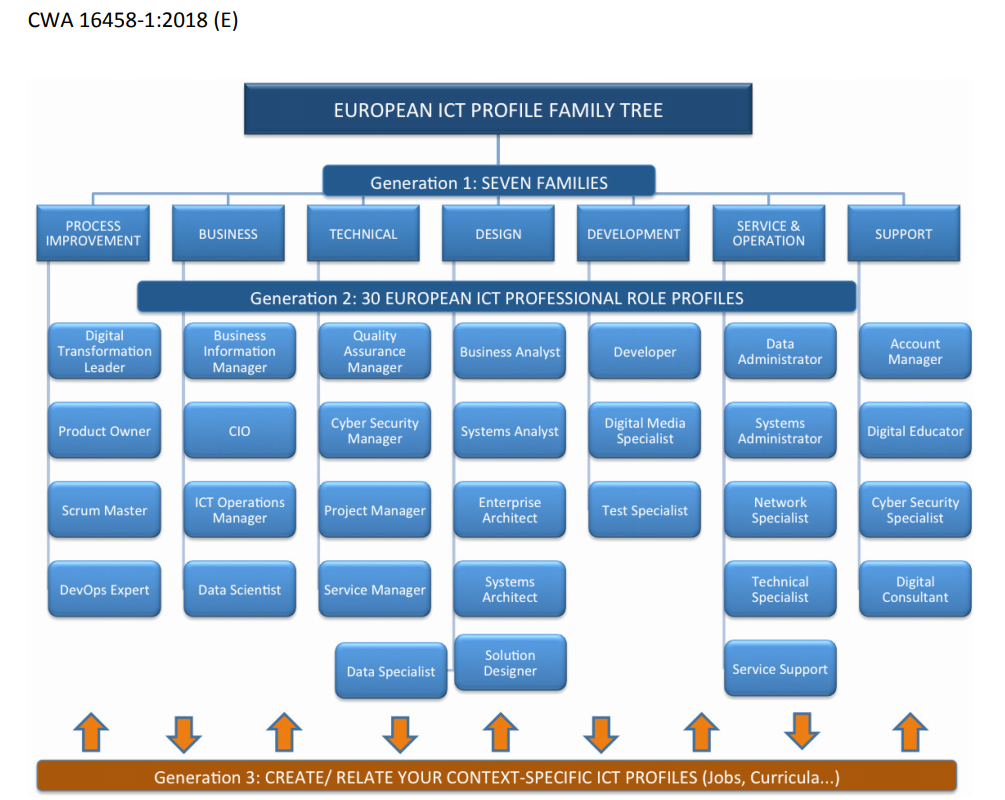
<p><a href="http://www.ecompetences.eu/e-cf-overview/" target="_blank">This framework</a> could be used to assess (IT) competency within organisations. There are four dimensions, 40 competencies, and 
<a href="http://www.ecompetences.eu/ict-professional-profiles/" target="_blank">30 ICT professional role profiles</a>.</p>

<p><img src="https://eimerttech.files.wordpress.com/2019/07/2019-07-14_095203-maindesk_001.png" title="center" alt="center" style="display: block; margin: auto;" />
Image: 30 ICT professional role profiles (European model)<br /></p>

<h2 id="other-it-competency-frameworks">Other IT competency frameworks</h2>
<p>This blogpost features two frameworks, I know there are several frameworks out there. I use these frameworks to grow to the next level.</p>

<p>Ask yourself: what is the level I am currently playing at? On what level do I hold myself accountable for? Go and do the work 💪.</p>]]></content><author><name>Eimert Vink</name></author><category term="life" /><summary type="html"><![CDATA[IT competency frameworks; what is the level you are playing at? On what level do you hold yourself accountable for?]]></summary></entry><entry><title type="html">running a single Java source code file as a script (Java 11 with shebang support)</title><link href="https://eimertvink.nl/2019/06/21/java-single-script-file.html" rel="alternate" type="text/html" title="running a single Java source code file as a script (Java 11 with shebang support)" /><published>2019-06-21T00:00:00+00:00</published><updated>2019-06-21T00:00:00+00:00</updated><id>https://eimertvink.nl/2019/06/21/java-single-script-file</id><content type="html" xml:base="https://eimertvink.nl/2019/06/21/java-single-script-file.html"><![CDATA[<p>This cool new feature allows to run a single java source file as a shell or python script, without the need to compile
the source code first. This opens up the possibility to run simple (single file) Java programs fairly easily. You’ll need
an UNIX based operating system for this guide.</p>

<p><img src="https://32jn1p2jfust2jm6d92xtg5d-wpengine.netdna-ssl.com/wp-content/uploads/2018/03/Duke-11.png" title="center" alt="center" style="display: block; margin: auto;" /></p>

<h2 id="1-create-a-helloworld-file">1) Create a ‘HelloWorld’ file</h2>
<p><strong>Don’t</strong> use .java as the extension. Java will not recognize the shebang. You can use any other extension, or none.</p>
<div class="language-java highlighter-rouge"><div class="highlight"><pre class="highlight"><code><span class="err">#</span><span class="o">!/</span><span class="n">usr</span><span class="o">/</span><span class="n">bin</span><span class="o">/</span><span class="n">java</span> <span class="o">--</span><span class="n">source</span> <span class="mi">11</span>

<span class="kd">public</span> <span class="kd">class</span> <span class="nc">HelloWorld</span> <span class="o">{</span>
    <span class="kd">public</span> <span class="kd">static</span> <span class="kt">void</span> <span class="nf">main</span><span class="o">(</span><span class="nc">String</span><span class="o">...</span> <span class="n">args</span><span class="o">)</span> <span class="o">{</span>
      <span class="nc">System</span><span class="o">.</span><span class="na">out</span><span class="o">.</span><span class="na">println</span><span class="o">(</span><span class="s">"Running Java 11 as script"</span><span class="o">);</span>
    <span class="o">}</span>
<span class="o">}</span>
</code></pre></div></div>
<h2 id="2-make-sure-jdk-11-is-installed">2) Make sure JDK 11 is installed</h2>
<p>Java 11 does not have to be the default.</p>
<div class="language-bash highlighter-rouge"><div class="highlight"><pre class="highlight"><code>eimert@EIM ~ <span class="nv">$ </span><span class="nb">sudo </span>update-alternatives <span class="nt">--config</span> java
Er zijn 5 beschikbare keuzemogelijkheden voor het alternatief java <span class="o">(</span>dat voorziet <span class="k">in</span> /usr/bin/java<span class="o">)</span><span class="nb">.</span>

  Keuze        Pad                                             Prioriteit Status
<span class="nt">------------------------------------------------------------</span>
<span class="k">*</span> 0            /usr/lib/jvm/java-11-openjdk-amd64/bin/java      1111      automatische modus
  1            /usr/lib/jvm/java-11-openjdk-amd64/bin/java      1111      handmatige modus
  2            /usr/lib/jvm/java-12-oracle/bin/java             1091      handmatige modus
  3            /usr/lib/jvm/java-8-openjdk-amd64/bin/java       1090      handmatige modus
  4            /usr/lib/jvm/java-8-openjdk-amd64/jre/bin/java   1081      handmatige modus
  5            /usr/lib/jvm/java-9-openjdk-amd64/bin/java       1091      handmatige modus

Druk &lt;enter&gt; om de huidige keuze[<span class="k">*</span><span class="o">]</span> te behouden, of typ een keuzenummer <span class="k">in</span>: 
</code></pre></div></div>

<h2 id="3-run-the-script">3) Run the script</h2>
<p>Despite <code class="language-plaintext highlighter-rouge">#!/usr/bin/java --source 11</code> as the first line, simply running <code class="language-plaintext highlighter-rouge">java HelloWorld</code> does not work:</p>
<div class="language-bash highlighter-rouge"><div class="highlight"><pre class="highlight"><code>eimert@EIM ~ <span class="nv">$ </span>java HelloWorld 
Error: Could not find or load main class HelloWorld
Caused by: java.lang.ClassNotFoundException: HelloWorld
</code></pre></div></div>
<p>Java does compile (under water) and execute when specifying <code class="language-plaintext highlighter-rouge">--source 11</code> as argument.</p>
<div class="language-bash highlighter-rouge"><div class="highlight"><pre class="highlight"><code>eimert@EIM ~ <span class="nv">$ </span>java <span class="nt">--source</span> 11 HelloWorld 
Running Java 11 as script
</code></pre></div></div>

<p>The file executes with default <em>0644</em> permissions:</p>
<div class="language-bash highlighter-rouge"><div class="highlight"><pre class="highlight"><code>eimert@EIM ~ <span class="nv">$ </span><span class="nb">ls</span> <span class="nt">-al</span> HelloWorld 
<span class="nt">-rw-r--r--</span> 1 eimert eimert 164 jun 21 10:24 HelloWorld
eimert@EIM ~ <span class="nv">$ </span>java <span class="nt">--source</span> 11 HelloWorld 
Running Java 11 as script
</code></pre></div></div>

<h2 id="conclusion">Conclusion</h2>
<p>Running ‘Java as a script’ gives developers the ability to easily run small utilities on a UNIX system. This feature 
opens up the possibility to run Java utilities on an UNIX system.</p>

<h2 id="references">References</h2>
<ul>
  <li><a href="https://github.com/sandermak/java-next-labs" target="_blank">https://github.com/sandermak/java-next-labs</a></li>
  <li><a href="https://dzone.com/articles/single-file-source-code-with-java-11" target="_blank">https://dzone.com/articles/single-file-source-code-with-java-11</a></li>
  <li><a href="https://www.baeldung.com/java-single-file-source-code" target="_blank">https://www.baeldung.com/java-single-file-source-code</a></li>
</ul>]]></content><author><name>Eimert Vink</name></author><category term="tech" /><category term="java" /><category term="java 11" /><category term="jdk" /><category term="script" /><summary type="html"><![CDATA[A new feature of Java 11 is the possibility to run a single Java source code file as a script.]]></summary></entry><entry><title type="html">top 10 talks GOTO software development conference Amsterdam 2019</title><link href="https://eimertvink.nl/2019/06/21/top-10-talks-goto-amsterdam-2019.html" rel="alternate" type="text/html" title="top 10 talks GOTO software development conference Amsterdam 2019" /><published>2019-06-21T00:00:00+00:00</published><updated>2019-06-21T00:00:00+00:00</updated><id>https://eimertvink.nl/2019/06/21/top-10-talks-goto-amsterdam-2019</id><content type="html" xml:base="https://eimertvink.nl/2019/06/21/top-10-talks-goto-amsterdam-2019.html"><![CDATA[<p>My top ten talks from the <a href="https://gotoams.nl" target="_blank">GOTO software development conference in Amsterdam</a>, 17-20 June 2019.
Most of the talks have been recorded and (will be) published on the <a href="https://www.youtube.com/user/GotoConferences/videos" target="_blank">GotoConferences youtube channel</a>.</p>

<p><img src="https://pbs.twimg.com/media/D74qAKcXkAAriHl.png" title="center" alt="center" style="display: block; margin: auto;" /></p>

<h2 id="1-extreme-digitalization-in-china">1) <a href="https://gotoams.nl/2019/sessions/1060" target="_blank">Extreme Digitalization in China</a></h2>
<p>I’m impressed by the advances China is making in terms of digitisation. Take WeChat for example, with sub-programmes such as
CoffeeBox that have gained tremendous popularity. Payments using face recognition are now commonplace in China, while I 
haven’t seen this happening (yet) here in The Netherlands. China has a very competitive start-up scene, with long workdays 
(9-21h, 6 days a week). The competition is fierce, and ideas are copied by competitors. Businesses <em>have</em> to be the first, 
it does not matter if a product is only partially finished.</p>

<h2 id="2-machine-ethics">2) <a href="https://gotoams.nl/2019/sessions/782" target="_blank">Machine Ethics</a></h2>
<p>This talk by Nell Watson gives an update on the latest developments in AI.</p>

<h2 id="3-energy-and-education-access-for-remote-communities">3) <a href="https://gotoams.nl/2019/sessions/757" target="_blank">Energy and Education Access for Remote Communities</a></h2>
<p>This keynote was touching because it shows how much the quality of life could be improved by simply installing proper 
solar panels and lighting in remote (Himalayan) mountain villages.</p>

<h2 id="4-augmented-reality-beyond-virtual-objects-floating-in-physical-space">4) <a href="https://gotoams.nl/2019/sessions/785" target="_blank">Augmented Reality, Beyond Virtual Objects Floating in Physical Space</a></h2>
<p>This talk gave me new ideas for applying augmented reality in software.</p>

<h2 id="5-building-a-cloud-native-event-driven-microservice-platform-for-crypto-currency-trading-with-spring-webflux">5) <a href="https://gotoams.nl/2019/sessions/752" target="_blank">Building a Cloud-native Event-driven Microservice Platform for Crypto Currency Trading with Spring Webflux</a></h2>
<p>Erwin de Gier explained how he built BLOX, a cryptocurrency trading platform using reactive technology (Spring Webflux) 
in a microservices architecture.</p>

<h2 id="6-boost-your-api-development-with-graphql--prisma">6) <a href="https://gotoams.nl/2019/sessions/784" target="_blank">Boost your API Development with GraphQL &amp; Prisma</a></h2>
<p>Graph databases are new and promising technologies.</p>

<h2 id="7-taking-security-seriously">7) <a href="https://gotoams.nl/2019/sessions/1077" target="_blank">Taking Security Seriously</a></h2>
<p>Finally a security talk that is enjoyable. Philippe gives several case studies, one is showing the fragility of open source software development.</p>

<h2 id="8-event-driven-microservices-the-sense-the-non-sense-and-a-way-forward">8) <a href="https://gotoams.nl/2019/sessions/862" target="_blank">Event-Driven Microservices, the Sense, the Non-sense and a Way Forward</a></h2>
<p>Allard, creator of the Axon framework, provides some common sense for developers on how to go about an event-driven microservice architecture.</p>

<h2 id="9-innovate-using-machine-learning-and-ai">9) <a href="https://gotoams.nl/2019/sessions/861" target="_blank">Innovate using Machine Learning and AI</a></h2>
<p>Altough this is a subtle sales talk/showcase of the AI capabilities offered by AWS, it inspired me with new ideas for new functionalities in apps.</p>

<h2 id="10-how-we-built-google-tulip-by-using-serverless-technology-and-machine-learning">10) <a href="https://gotoams.nl/2019/sessions/1070" target="_blank">How we Built Google Tulip by using Serverless Technology and Machine Learning</a></h2>
<p>Google Tulip was the April fools’ day joke of 2019 by Google (in The Netherlands). The team gave an energetic and 
humorous presentation. <a href="https://twitter.com/EimertVink/status/1141637923873415168" target="_blank"><em>“Looking forward for bouquet scanning capabilities”</em></a></p>]]></content><author><name>Eimert Vink</name></author><category term="tech" /><category term="goto" /><category term="conference" /><category term="amsterdam" /><summary type="html"><![CDATA[My top ten favourite talks from the GOTO conference Amsterdam, 17-20 June 2019]]></summary></entry><entry><title type="html">how to get a sql console on an android sqlite database</title><link href="https://eimertvink.nl/2019/05/08/android-adb-retrieve-database-using-run-as.html" rel="alternate" type="text/html" title="how to get a sql console on an android sqlite database" /><published>2019-05-08T00:00:00+00:00</published><updated>2019-05-08T00:00:00+00:00</updated><id>https://eimertvink.nl/2019/05/08/android-adb-retrieve-database-using-run-as</id><content type="html" xml:base="https://eimertvink.nl/2019/05/08/android-adb-retrieve-database-using-run-as.html"><![CDATA[<p>This is a short post on all the options I’ve been through to get a (simple) sql console for Android development.
And it saves time when you can pick the right tool straight away :).<br />
<strong>Update 11-05-2019</strong>: database export is possible on AVD devices too.
Added a fix for when the exported database file is empty (call close() to let SQLite write its journal to disk).<br /></p>

<p>In descending order of goodness:</p>
<h2 id="1-adb-exec-out-run-as-nleimertvinksmv-cat-databasessmv_db--smv_db_copy">1) adb exec-out run-as nl.eimertvink.smv cat databases/smv_db &gt; smv_db_copy</h2>
<p>This is the best and fastest way from <a href="https://stackoverflow.com/questions/18471780/android-adb-retrieve-database-using-run-as" target="_blank">stackoverflow</a>.
You’ll need <del>your phone connected and</del> a physical phone <sup>(with debugging enabled)</sup> <em>or</em> an AVD device
<sup>(<a href="https://developer.android.com/studio/debug" target="_blank">AVD: debugging is enabled by default</a>)</sup>.<br /></p>

<p>A script that simplifies the copy action is <a href="https://github.com/Pixplicity/humpty-dumpty-android" target="_blank">humpty-dumpty-android</a>. I’m not going to describe that tool here.<br />
This is the basic way to get the database on your local machine:</p>
<ol>
  <li>Copy db to machine:
    <div class="language-bash highlighter-rouge"><div class="highlight"><pre class="highlight"><code>adb exec-out run-as nl.eimertvink.smv <span class="nb">cat </span>databases/smv_db <span class="o">&gt;</span> smv_db_copy
</code></pre></div>    </div>
  </li>
  <li>View tables:
    <div class="language-bash highlighter-rouge"><div class="highlight"><pre class="highlight"><code>eimert@EIM SMV <span class="nv">$ </span>sqlite3 smv_db_copy
<span class="o">(</span>... omitted ...<span class="o">)</span>
sqlite&gt; .tables
sqlite&gt;
</code></pre></div>    </div>
  </li>
</ol>

<p>No tables found; empty database file. Read on how to resolve this.</p>

<h3 id="what-to-do-when-the-database-file-is-empty">What to do when the database file is empty</h3>
<p>You’ll need to call close() on the database instance, to let SQLite write its journal to the database file. For that we’ll create a button that calls close();.</p>
<h3 id="create-a-hidden-button-for-dbclose">Create a (hidden) button for db.close()</h3>
<p>Some Java code that handles the button click:</p>
<div class="language-java highlighter-rouge"><div class="highlight"><pre class="highlight"><code><span class="kd">public</span> <span class="kd">class</span> <span class="nc">MainActivity</span> <span class="kd">extends</span> <span class="nc">AppCompatActivity</span> <span class="o">{</span>
        <span class="c1">// ... omitted ...</span>

        <span class="c1">// Called when the user selects a contextual menu item</span>
        <span class="nd">@Override</span>
        <span class="kd">public</span> <span class="kt">boolean</span> <span class="nf">onActionItemClicked</span><span class="o">(</span><span class="nc">ActionMode</span> <span class="n">mode</span><span class="o">,</span> <span class="nc">MenuItem</span> <span class="n">item</span><span class="o">)</span> <span class="o">{</span>
            <span class="k">switch</span> <span class="o">(</span><span class="n">item</span><span class="o">.</span><span class="na">getItemId</span><span class="o">())</span> <span class="o">{</span>
                <span class="k">case</span> <span class="no">R</span><span class="o">.</span><span class="na">id</span><span class="o">.</span><span class="na">action_close_db</span><span class="o">:</span>
                    <span class="nc">Log</span><span class="o">.</span><span class="na">d</span><span class="o">(</span><span class="no">TAG</span><span class="o">,</span> <span class="n">getString</span><span class="o">(</span><span class="no">R</span><span class="o">.</span><span class="na">string</span><span class="o">.</span><span class="na">action_close_db</span><span class="o">));</span>
                    <span class="k">if</span> <span class="o">(</span><span class="n">db</span> <span class="o">==</span> <span class="kc">null</span><span class="o">)</span> <span class="o">{</span>
                        <span class="nc">Log</span><span class="o">.</span><span class="na">e</span><span class="o">(</span><span class="no">TAG</span><span class="o">,</span> <span class="s">"Unable to re-open database instance "</span> <span class="o">+</span> <span class="n">db</span><span class="o">);</span>
                        <span class="nc">Toast</span><span class="o">.</span><span class="na">makeText</span><span class="o">(</span><span class="nc">MainActivity</span><span class="o">.</span><span class="na">this</span><span class="o">,</span> <span class="n">getString</span><span class="o">(</span><span class="no">R</span><span class="o">.</span><span class="na">string</span><span class="o">.</span><span class="na">action_opened_db</span><span class="o">),</span> <span class="nc">Toast</span><span class="o">.</span><span class="na">LENGTH_LONG</span><span class="o">).</span><span class="na">show</span><span class="o">();</span>
                    <span class="o">}</span> <span class="k">else</span> <span class="k">if</span> <span class="o">(</span><span class="nc">AppDatabase</span><span class="o">.</span><span class="na">isOpen</span><span class="o">(</span><span class="n">db</span><span class="o">))</span> <span class="o">{</span>
                        <span class="nc">Log</span><span class="o">.</span><span class="na">d</span><span class="o">(</span><span class="no">TAG</span><span class="o">,</span> <span class="s">"Closing database instance "</span> <span class="o">+</span> <span class="n">db</span><span class="o">);</span>
                        <span class="nc">AppDatabase</span><span class="o">.</span><span class="na">close</span><span class="o">(</span><span class="n">db</span><span class="o">);</span>
                        <span class="n">db</span> <span class="o">=</span> <span class="kc">null</span><span class="o">;</span>
                        <span class="nc">Toast</span><span class="o">.</span><span class="na">makeText</span><span class="o">(</span><span class="nc">MainActivity</span><span class="o">.</span><span class="na">this</span><span class="o">,</span> <span class="n">getString</span><span class="o">(</span><span class="no">R</span><span class="o">.</span><span class="na">string</span><span class="o">.</span><span class="na">action_closed_db</span><span class="o">),</span> <span class="nc">Toast</span><span class="o">.</span><span class="na">LENGTH_SHORT</span><span class="o">).</span><span class="na">show</span><span class="o">();</span>
                    <span class="o">}</span>
                    <span class="n">mode</span><span class="o">.</span><span class="na">finish</span><span class="o">();</span> <span class="c1">// Action picked, so close the contextual menu</span>
                    <span class="k">return</span> <span class="kc">true</span><span class="o">;</span>
                <span class="k">default</span><span class="o">:</span>
                    <span class="k">return</span> <span class="kc">false</span><span class="o">;</span>
            <span class="o">}</span>
        <span class="o">}</span>
        <span class="c1">// ... omitted ...</span>
<span class="o">}</span>
</code></pre></div></div>
<p>After invoking the button, the db connection cannot be re-opened.
The isOpen(db) and close(db) calls refers to these static methods in the AppDatabase class:</p>
<div class="language-java highlighter-rouge"><div class="highlight"><pre class="highlight"><code><span class="kd">public</span> <span class="kd">abstract</span> <span class="kd">class</span> <span class="nc">AppDatabase</span> <span class="kd">extends</span> <span class="nc">RoomDatabase</span> <span class="o">{</span>
    <span class="c1">// ... omitted ...</span>
    <span class="kd">public</span> <span class="kd">static</span> <span class="kt">boolean</span> <span class="nf">isOpen</span><span class="o">(</span><span class="nc">AppDatabase</span> <span class="n">db</span><span class="o">)</span> <span class="o">{</span>
        <span class="k">return</span> <span class="n">db</span><span class="o">.</span><span class="na">isOpen</span><span class="o">();</span>
    <span class="o">}</span>

    <span class="kd">public</span> <span class="kd">static</span> <span class="kt">void</span> <span class="nf">close</span><span class="o">(</span><span class="nc">AppDatabase</span> <span class="n">db</span><span class="o">)</span> <span class="o">{</span>
        <span class="n">db</span><span class="o">.</span><span class="na">close</span><span class="o">();</span> <span class="c1">// calls close() on RoomDatabase instance.</span>
    <span class="o">}</span>
<span class="o">}</span>
</code></pre></div></div>
<p>See <a href="https://medium.com/@ajaysaini.official/building-database-with-room-persistence-library-ecf7d0b8f3e9" target="_blank">this blogpost</a>
 for more details on how I’ve setup Android Room.</p>
<h3 id="test-the-dbclose-button">Test the db.close() button</h3>
<p>Launch the emulator and start an adb shell:</p>
<div class="language-bash highlighter-rouge"><div class="highlight"><pre class="highlight"><code>adb shell
</code></pre></div></div>
<p>Execute “run-as your.app.realm”:</p>
<div class="language-bash highlighter-rouge"><div class="highlight"><pre class="highlight"><code>generic_x86:/ <span class="nv">$ </span>run-as nl.eimertvink.smv
generic_x86:/data/data/nl.eimertvink.smv <span class="err">$</span>
</code></pre></div></div>
<p>Check the database (called smv_db) file size. In this example the actual db has no tables (Size: 4096).</p>
<div class="language-bash highlighter-rouge"><div class="highlight"><pre class="highlight"><code>generic_x86:/data/data/nl.eimertvink.smv <span class="nv">$ </span><span class="nb">stat </span>databases/smv_db                                                          &lt;
  File: <span class="sb">`</span>databases/smv_db<span class="s1">'
  Size: 4096	 Blocks: 8	 IO Blocks: 512	regular file
Device: fc00h/64512d	 Inode: 123232	 Links: 1
Access: (660/-rw-rw----)	Uid: (10088/  u0_a88)	Gid: (10088/  u0_a88)
Access: 2019-05-11 12:37:50.711995122
Modify: 2019-05-11 12:37:50.711995122
Change: 2019-05-11 12:56:09.251990576
</span></code></pre></div></div>

<p>Click on the button that is calling AppDatabase.close() in the app:</p>
<iframe src="https://giphy.com/embed/KZYnGwVh8ICN73jXod" width="276" height="480" frameborder="0" class="giphy-embed" allowfullscreen=""></iframe>
<p><a href="https://giphy.com/gifs/KZYnGwVh8ICN73jXod">via GIPHY</a></p>

<p>Again check the database file size. Notice the file has increased in size (from 4096 to to 40960).</p>
<div class="language-bash highlighter-rouge"><div class="highlight"><pre class="highlight"><code>generic_x86:/data/data/nl.eimertvink.smv <span class="nv">$ </span><span class="nb">stat </span>databases/smv_db                                                          &lt;
  File: <span class="sb">`</span>databases/smv_db<span class="s1">'
  Size: 40960	 Blocks: 80	 IO Blocks: 512	regular file
Device: fc00h/64512d	 Inode: 123232	 Links: 1
Access: (660/-rw-rw----)	Uid: (10088/  u0_a88)	Gid: (10088/  u0_a88)
Access: 2019-05-11 12:37:50.711995122
Modify: 2019-05-11 12:57:09.121990328
Change: 2019-05-11 12:57:09.121990328
</span></code></pre></div></div>
<p>Let’s copy the filled database file to our local machine.</p>
<ol>
  <li>Copy db to machine:
    <div class="language-bash highlighter-rouge"><div class="highlight"><pre class="highlight"><code>adb exec-out run-as nl.eimertvink.smv <span class="nb">cat </span>databases/smv_db <span class="o">&gt;</span> smv_db_copy
</code></pre></div>    </div>
  </li>
  <li>Happy querying:
    <div class="language-bash highlighter-rouge"><div class="highlight"><pre class="highlight"><code>eimert@EIM SMV <span class="nv">$ </span>sqlite3 smv_db_copy
<span class="o">(</span>... omitted ...<span class="o">)</span>
sqlite&gt; .tables
Question           ScoreDetail        android_metadata
Rating             TestSession        room_master_table
sqlite&gt; .quit
</code></pre></div>    </div>
  </li>
</ol>

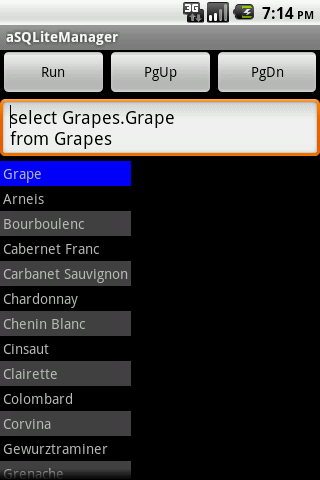
<h2 id="2-asqlitemanager">2) <a href="https://play.google.com/store/apps/details?id=dk.andsen.asqlitemanager" target="_blank">aSQLiteManager</a></h2>
<p>This app gives a SQL console on your phone. You can access the database of other apps when your phone is rooted.<br />
<img src="https://lh3.ggpht.com/zIm_Ai93gGfiKgGDHKb9LddN-elxqJ4IylTzYqtLoGdw2lU_ieqjvDEIT0d5uxxzZd0=w1920-h1008-rw" /><br />
<a href="https://play.google.com/store/apps/details?id=dk.andsen.asqlitemanager" target="_blank">source</a></p>

<h2 id="3-android-debug-database">3) <a href="https://github.com/amitshekhariitbhu/Android-Debug-Database" target="_blank">Android Debug Database</a></h2>
<p>You’ll get a nice web gui on <a href="http://localhost:8080">localhost:8080</a>. But in my case I had quite some trouble with the tool (URL not loading).
Running <code class="language-plaintext highlighter-rouge">adb forward tcp:8080 tcp:8080</code> solved that issue only a few times.</p>

<h2 id="conclusion">Conclusion</h2>
<p>I’d go for <code class="language-plaintext highlighter-rouge">adb exec-out run-as</code> because it is simple and just works.</p>]]></content><author><name>Eimert Vink</name></author><category term="tech" /><category term="android" /><category term="sqlite" /><category term="export" /><category term="avd" /><category term="database console" /><summary type="html"><![CDATA[Options include 1) `adb exec-out run-as` on an USB device, 2) aSQLiteManager and 3) Android Debug database.]]></summary></entry></feed>